
Art2U
A mobile app that fosters engagement among artists by creating a safe space for art and emphasizing diversity and inclusion through spotlighting.


Client
Design at UCI's Design-a-thon 2024
Role
UI/UX Designer
Duration
3 days
The Challenge
In 2024, I participated in a design-a-thon held by my design club at UCI. I joined a team of 3 and helped design the UI and UX of a mobile app that responded to the competition’s prompt.
The challenge was to create a product that would promote self-expression, individual authenticity, and creativity in a time where there is anxiety about human essence in modern technology.
"
Design your own digital application or product that fosters the cultivation of creative expression in order to create a more inclusive and equitable society.
"
- Design at UCI

The solution
My teammates and I believed the best way to cultivate and promote self-expression and creativity was to design a community platform that is open to artists coming from various artistic expressions.
Art2U is a mobile app where people with artistic interests such as crocheting, painting, creating music, cooking, etc., can share their work through posts and portfolios, participate in monthly challenges, and join groups of similar interests.
To tackle the call for a more inclusive society, specifically in the art community, Art2U uplifts minority communities by spotlighting them daily and by holding monthly challenges to celebrate and bring awareness to specific communities or holidays.
Timeline
Since we only had about 2-3 days to develop the user research, wireframing, prototyping, and preparation for presentation material, it was imperative that a schedule be made to keep progress in check.
Day 1
Day 2
Day 3


User research, analysis, and ideation
-
Send out survey and collect responses
-
Compare mainstream art platforms
-
Create affinity diagram to analyze data
-
Begin sketching
Design
-
Design wireframes, mockups, and interactive prototypes
-
Establish color palette and style guidelines
-
Record video demo
Review
-
Review video demo and deliverables
-
Submit final project
User needs, pain points, and wants
In order to better understand our target audience, those who indulge in any kind of creative expression, we sent out a google form to ask about their interests, needs, and likes and dislikes in a community artist app. Within a day, we received 27 responses, from which we consolidated and analyzed in an affinity map.
Survey findings
How interested are you in connecting with others who share the same creative expressions?
(27 responses)

55.6 % have an interest in connecting with other artists
If you create any form of art, what kind of art do you make? (24 responses)
People create various forms of art besides “drawing”

Which of these features would you like to see in a community app for artists? (27 responses)

Most would like these features...
-
spotlighting minority artists
-
tags for different art forms
-
nearby creative events
-
monthly themed art events
Likes & Dislikes
In addition to getting to know more about the respondents themselves and their different kinds of artistic interests, we also learned about their likes and dislikes with existing apps and websites targeted towards art communities.

“Greater focus on communities and work done by marginalized artists”
“I want to refer to them for information and events.”
“Easy to be able to get the other artist’s contact, share work, and find others who do similar artwork”
A quality they disliked were bad algorithms that pushed only popular artists to the forefront, overshadowing smaller creators and their work. In addition to concerns with security and extreme monetization, there was also a hope for more social aspects where artists can come together.
Hearing the call for more social events/features, I decided to incorporate monthly challenges where artists can submit and share their artworks related to the themes that surround upcoming holidays, especially those held in honor of specific communities.
Respondents liked certain qualities and features, some of which was considered for Art2U. They liked being able to search for other artists and their information, and connecting with them for further collaboration. Furthermore, they liked having a sense of community, as well as seeing greater focus on work done by marginalized communities. In regards to transparency, they liked that there are stricter plagiarism rules, especially rules that prohibit full on AI art.
As the challenge addressed the importance of inclusiveness, I pondered the ways in which we can shine light on certain communities.

“I wish they focused on the social part of the app more, maybe including monthly prompts or challenges to encourage collaboration”
“too concentrated on bigger creators/artists (not making room for small artists)”
Existing Products
Now that there is data and feedback on potential users and their opinions on existing community platforms, it was our turn to get familiar with the kind of product we intended to make. To do this, we conducted research on a total of 6 artist apps/websites, and compared their features, pros, and cons.
For my competitive analysis, I analyzed ArtStation and DeviantArt, both of which are prominent websites used in the art community.
Competitive Analysis

Summary
Based on my observations and findings on ArtStation and DeviantArt, art websites tend to have some features in common, albeit in different levels. These include allowing users to have profile pages to showcase their artwork, the capability to save, share, and react to the art, explore other art and their creators, and more. As users are more likely to engage with something that they’re familiar with, these commonalities were considered in the design of Art2U
Although these two are long-standing existences in the art community, I did not find a feature in their websites that explicitly conveyed or described their efforts to promoting diversity in both art mediums and community. To make up for this, Art2U spotlights artists from minority groups, allows exploration of different art mediums, and hosts monthly challenges for various occasions or communities.
Sketches & lo-fi wireframing
Now that we’ve collected feedback and analyzed other products in the market, it was time for us to begin sketching ideas on what our product will look like. Despite our time constraints, we decided that each of us make our own sketches and come together to consolidate our ideas into formalized mockups.


I sketched a home page where users could explore and search art, as well as learn the ongoing events and artists showcased for the day. Their search results would yield other people’s posts of art that can then be filtered through tags or by category. Each post takes on the same layout, a design that was inspired by Instagram in order to enable and leverage UI familiarity. Each event has their own page where information about the community being paid homage and the rules of the challenge are described. Entering the challenge allows for your artwork to be showcased on the page. Viewing a user’s profile includes their biography, posts made, portfolio, and contact information. Users are allowed to create forums for specific art interests and can engage in discussions with others in the group.
Color palette & Typography
In deciding the general aesthetics of Art2U, these four colors (purple, light purple, baby blue, and white) were a good fit for the app. It set a fun and creative tone that was uplifting and encouraging of artistic expressions. The font, Nunito, added to the tone through it’s round typography.

Mockups
After reviewing initial sketches and arranging the overall look of the app, the pages and main features were decided and divided amongst the three of us for hi-fidelity mockup designing. I was responsible for designing the general look of the users’ posts, their profile page, and the individual event pages.
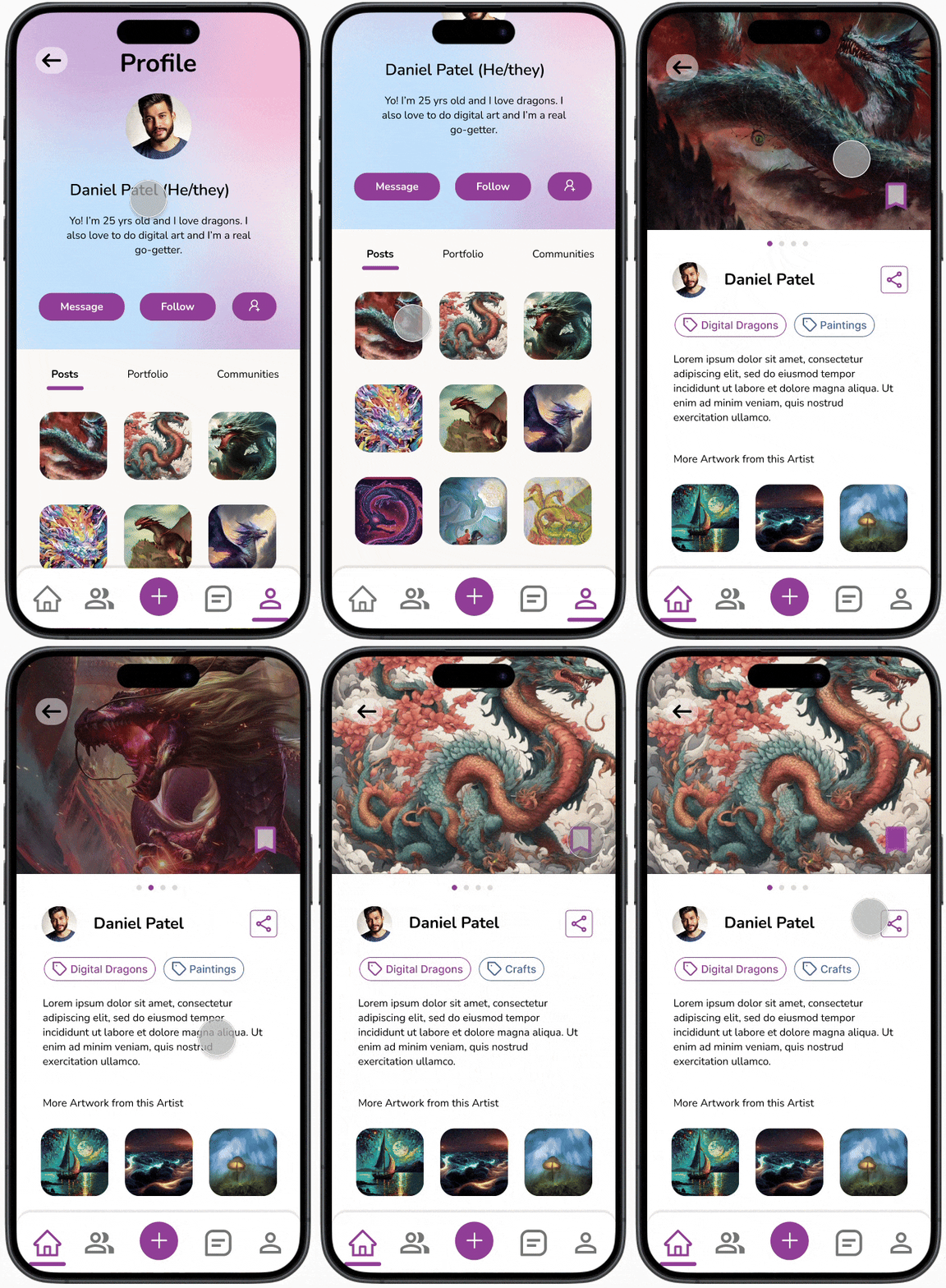
THe posts
Users should be able to...
-
post and explain their art
-
add tags related to the subject
-
introduce other work to viewers
By housing a familiar design, similar to other social media platforms, artists may adjust themselves more easily into Art2U’s UI. The capabilities to save and share posts, learn more about the artists, and browse other artwork are recognizable and user friendly. As a whole, these aspects allow users to exchange art, and custom-made tags to increase exposure to different art mediums.
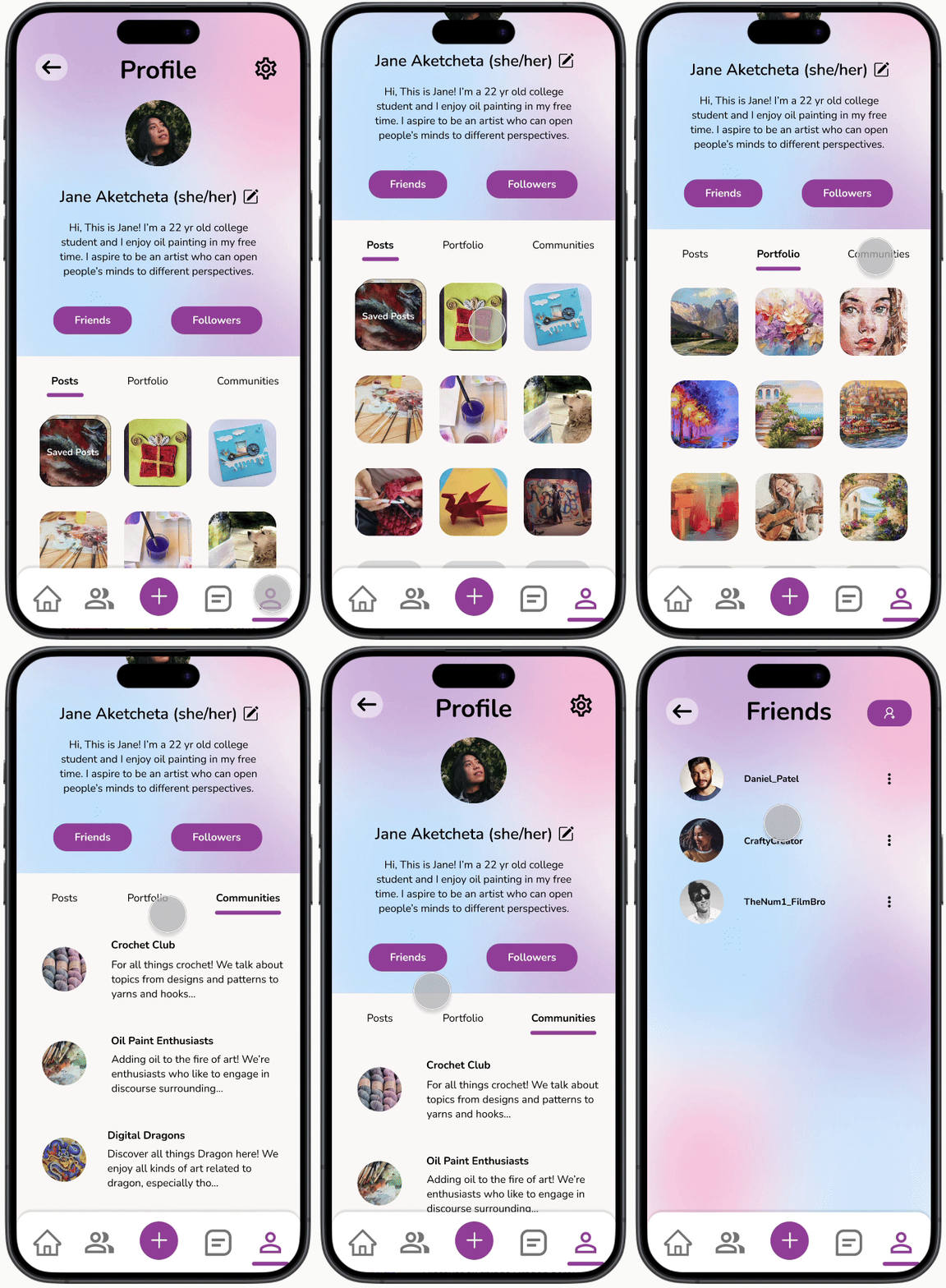
The first impression
A user can express themselves through...
-
bio for brief self-introduction
-
posts they’ve made
-
portfolio to showcase their work
-
communities they engage in
-
profile customization
In order to support artists and address the challenge’s call for self-expression, I designed these features that would allow for customization and a promotion of one’s work.
Furthermore, connection and networking among artists is fostered through the abilities to message, follow, or send friends requests to others on the platform.


The events
Monthly art events/challenges include...
-
the holiday or month dedicated to a particular community/minority
-
description of the occasion’s significance and historical background
-
the rules and instructions of the art challenge
-
participants’ submissions
Back in the user research phase of the project, survey respondents expressed the lack of focus on minority groups in the art community. Monthly challenges help address this concern by celebrating the days or months dedicated to them. My goal was to provide opportunities of self-expression and inclusiveness to a variety of artists.
Outcomes and lessons learned
As the design-a-thon came to an end, we recorded the demo video of our interactive prototype and submitted our work. To my surprise, we were placed within the top 10 and received the opportunity to present our product. Although I wasn’t expecting this outcome, Art2U was acknowledged by experienced mentors and designers in the industry, and it had made me feel proud of the work my teammates and I put into this project.
Due to time constraints, I wasn't able to conduct usability tests and gather any feedback from potential users. In the future however, I hope to collect insights, and use my findings to iterate and improve on Art2U’s design/user experience.
Key tips to succeed
To conclude, participating in my club’s design-a-thon was an enriching and challenging experience.
I learned that to create a successful and fulfilling product, one should...
-
Manage their time and workload, especially when under tight deadlines.
-
Collaborate and improve their designs with teammates.
-
Continue to consider the user's needs throughout.
